What Are Website Breadcrumbs? A Plain-English Guide for Hoteliers
How adding Breadcrumb Schema markup clarifies your hotel website structure, improves guest navigation, and creates clean search engine result trails.
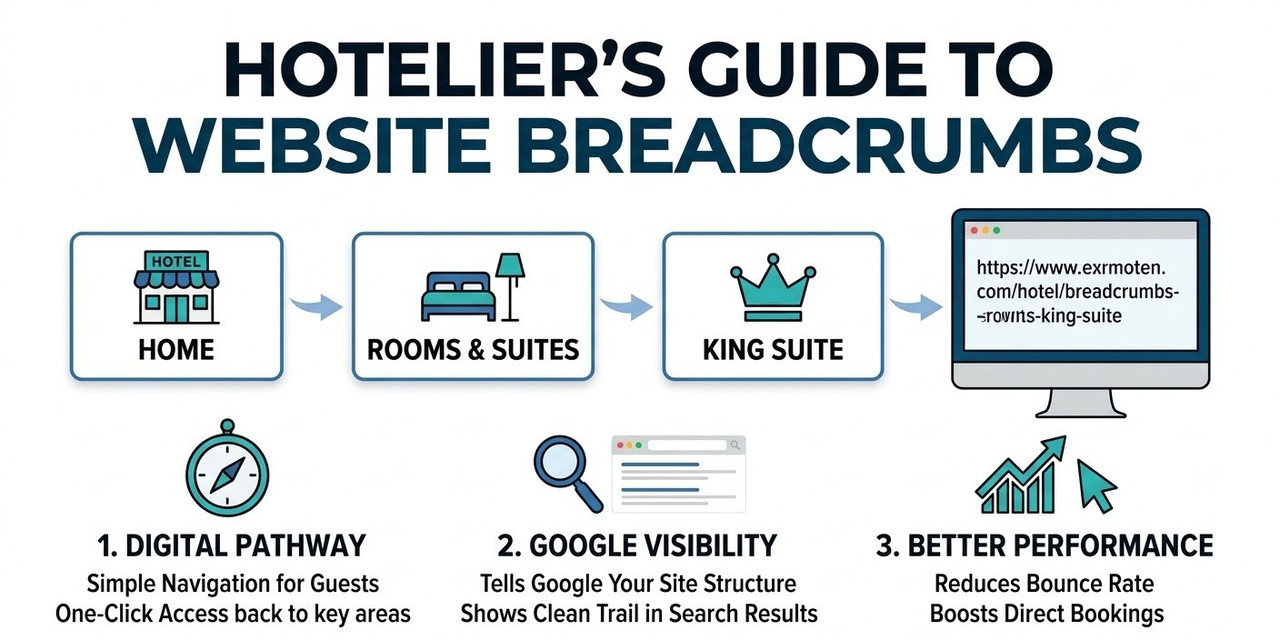
Imagine a guest walking into a multi-story hotel with no signage, no elevator directory, and no floor markers. Finding their room or the rooftop bar would be frustrating. They might get lost and walk straight back out the front door. Your hotel website works the exact same way. When potential guests land on a deep page, like a specific room type or wedding package, they need a clear digital trail to navigate back to broader categories. In technical SEO, this navigational trail is called breadcrumbs. Adding Breadcrumb Schema markup to your website does not just improve user experience. It helps search engines like Google understand your site structure and displays clean navigational links directly inside search engine result pages.
Why Breadcrumbs Matter for Hotel SEO
1. **Clear Hierarchy for Search Engines**: Search bots need to know how your pages connect. A breadcrumb trail explicitly defines parent-child relationships, such as linking Executive Suite to Rooms and Rooms to Homepage. 2. **Enhanced Search Engine Results Page Snippets**: Instead of showing a long, confusing URL in search results, Google replaces it with an elegant text breadcrumb trail. This makes your search listing look professional and increases click-through rates. 3. **Reduced Bounce Rates**: If a guest lands directly on a blog post or room page via Google, breadcrumbs give them an instant one-click path to explore your main offers rather than pressing the browser back button.
How Breadcrumb Schema Works (Without the Tech Jargon)
To search engines, a visual link trail on your webpage is helpful, but structured code is what guarantees indexing. Google looks for a specific code snippet called `BreadcrumbList` written in JSON-LD format. By defining each step in the user journey as an ordered list item, you explicitly show search engine crawlers where a page sits within your overall website architecture.
3 Steps to Add and Verify Breadcrumbs on Your Hotel Website
**Implementation Checklist:** 1. **Add Code to Your Website Template**: Place the `BreadcrumbList` script tag inside the `<head>` section of your custom HTML files or blog post template. 2. **Test with Google's Rich Results Tool**: Paste your page web address into Google’s free Rich Results Test. The tool will highlight if your breadcrumbs are detected correctly or if syntax errors exist. 3. **Monitor in Google Search Console**: Once published, navigate to **Google Search Console -> Enhancements -> Breadcrumbs**. Within a few days of Google re-crawling your pages, you will see a green Valid count confirming search engine recognition.
Conclusion
**Clean Structure Creates Better Guest and Bot Experiences** Clear breadcrumb trails eliminate user frustration and provide search engines with unambiguous structural context. By implementing and validating Breadcrumb Schema across your room types, amenities, and blog articles, you ensure every visitor and crawler can effortlessly navigate your digital property.
Frequently Asked Questions
What is the difference between visual breadcrumbs and Breadcrumb Schema?
Visual breadcrumbs are the clickable links visible to guests at the top of a webpage. Breadcrumb Schema is the hidden JSON-LD code in the background that explicitly informs Google of the page hierarchy.
Does adding breadcrumbs improve hotel keyword rankings?
While breadcrumbs are not a direct ranking factor on their own, they improve site crawlability, lower bounce rates, and enhance search snippet appearance, which indirectly boosts organic traffic.
Can I add breadcrumbs without hiring a developer?
Yes. If you use custom HTML or tools like Google AI Studio, you can generate the JSON-LD script and paste it directly into your page header section alongside your existing article schema.