Hotel Title Tags: How to Write Page Titles That Win Clicks and Direct Bookings
How independent hoteliers can craft clear, high-converting HTML title tags that outrank OTAs and prevent Google title rewrites.
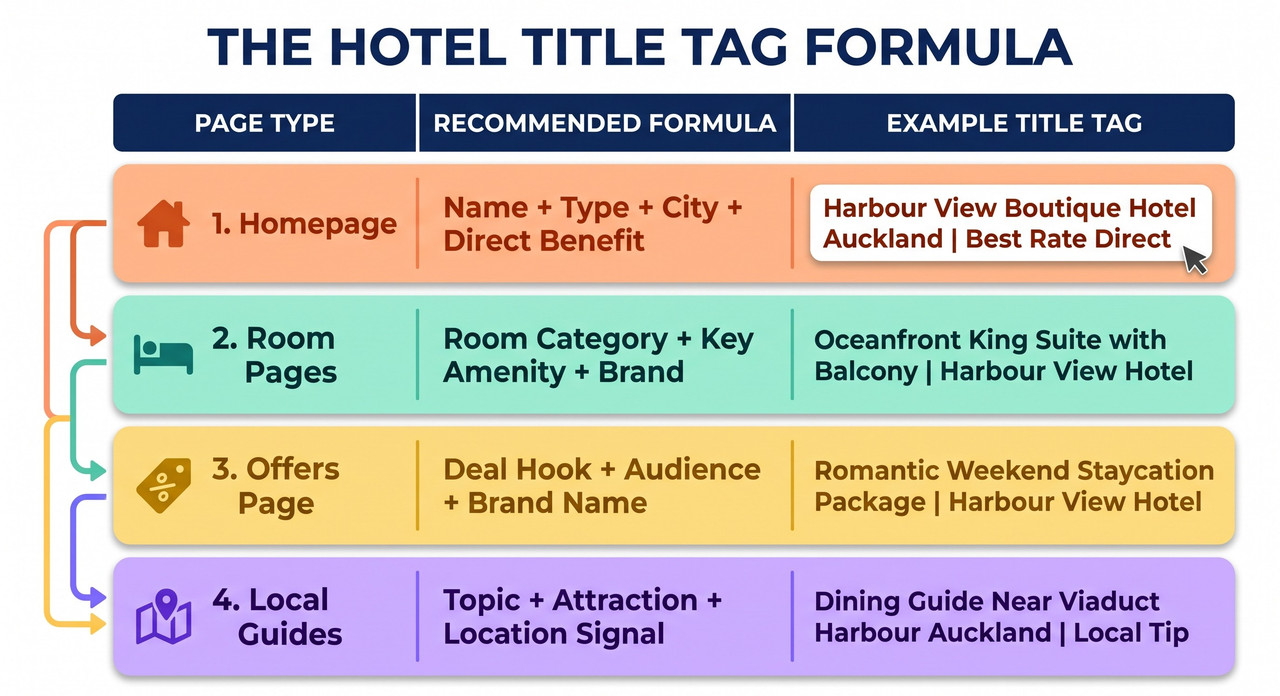
When a traveller searches for accommodation on Google, your page’s title tag is the very first impression your property makes. Displayed as the clickable blue headline in search results, browser tabs, and social shares, a well-crafted title tag tells both search engines and prospective guests what your hotel offers before they ever visit your website. Yet many independent hotels leave their title tags on default settings—displaying generic text like "Home | Harbour View Hotel" or stuffing every page with repetitive city keywords. When your title tags lack clarity, travellers scroll straight past your direct site and click on an Online Travel Agency (OTA) listing instead. By refining your hotel’s title tags with clear location signals and direct booking value, you can improve search visibility and capture higher click-through rates from high-intent guests. ### 4 Best Practices for High-Converting Hotel Title Tags Instead of using identical titles across your entire website, tailor each core page to match the exact search intent of your guests. **🔧 Implementation Blueprint:**
Stay Within the 50 to 60 Character Window
Search engines truncate titles that exceed roughly 600 pixels (around 55 to 60 characters). Keep your most important descriptors at the beginning so mobile users never see cut-off text.
Avoid Keyword Stuffing and Repetition
Repeating phrases like "Auckland Hotel, Best Hotel in Auckland, Cheap Auckland Accommodation" triggers spam filters and looks untrustworthy to travellers. Write naturally for humans first while including one primary keyword per page.
Give Every Page a Unique Title
Never duplicate your homepage title across your rooms, dining, or gallery pages. Unique titles help Google and AI search tools understand the distinct purpose of each URL on your site.
Prevent Google Title Rewrites
Search engines sometimes rewrite title tags if they are overly long, vague, or mismatched with your on-page `<h1>` heading. Align your `<title>` tag closely with your main page headline so Google displays your preferred copy.
Conclusion
Well-structured title tags are one of the highest-leverage technical SEO improvements an independent hotel can make. By staying within the 50 to 60 character window, writing unique titles for each core page, and aligning your `<title>` tags with on-page `<h1>` headings, you give travellers an unmistakable reason to choose your official website over an OTA listing. For more ways to monitor how your page titles perform in search results, explore our [Hotelier’s Google Search Console Glossary](/blog/the-hoteliers-google-search-console-glossary) or review how [canonical tags protect your hotel’s Google ranking](/blog/how-canonical-tags-protect-your-hotels-google-ranking).
Frequently Asked Questions
What is the difference between a title tag and an H1 heading?
The title tag (<title>) lives in your page’s HTML code and appears primarily on search engine results pages and browser tabs. The <h1> heading is the visible main title displayed at the top of the webpage once a visitor clicks through.
Should I include my hotel brand name in every title tag?
Yes. Placing your hotel name at the end of secondary page titles (separated by a pipe | or dash -) builds brand recognition while allowing your room or offer keywords to take priority at the front.
How long does it take for Google to update a changed title tag?
Once you update your title tags in your website CMS, Google typically reflects the change within a few days to two weeks, depending on how frequently your site is crawled. You can speed this up by requesting indexing inside Google Search Console.